Electronic Transmission Shift Control Pushbutton Replacement
Automatic Transmission - 10L80 MHS MQC | Repair Instructions - On Vehicle | Document ID: 5586531 Electronic Transmission Shift Control Pushbutton Replacement Removal Procedure
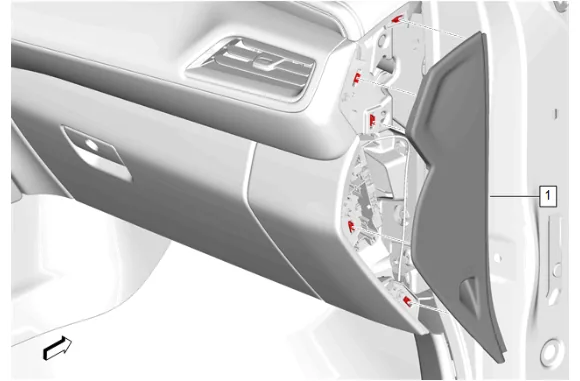
- Using a flat-bladed plastic trim tool, release the retaining clips.
- Instrument Panel Fuse Block Access Hole Cover (1) » Remove
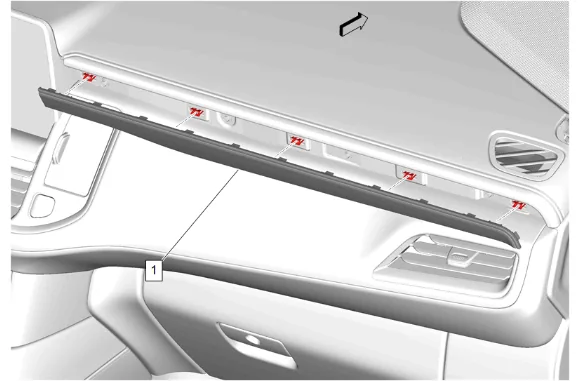
- Using a flat-bladed plastic trim tool, release the retaining clips.
- Instrument Panel Trim Plate Applique (1) » Remove
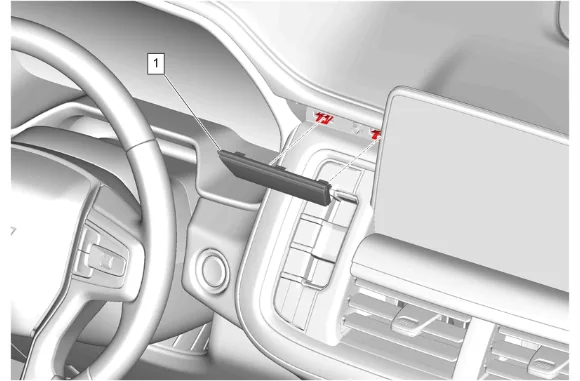
- Using a flat-bladed plastic trim tool, release the retaining clips.
- Instrument Panel Center Trim Plate Applique (1) » Remove
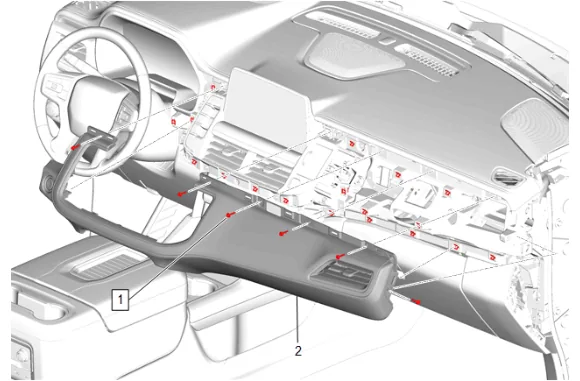
- Instrument Panel Upper Trim Panel Bolt (1) » Remove [6x]
- Using a flat-bladed plastic trim tool, release the retaining clips.
- Instrument Panel Trim Pad (2) » Remove
- Disconnect the electrical connector.
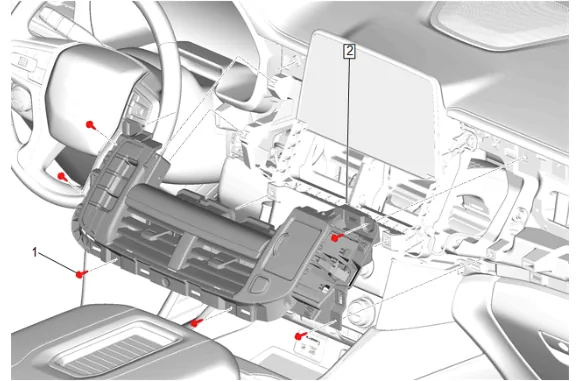
- Instrument Panel Center Trim Panel Bolt (1) » Remove [6x]
- Disconnect the electrical connectors.
- Instrument Panel Transmission Shift Opening Cover (2) » Remove
-
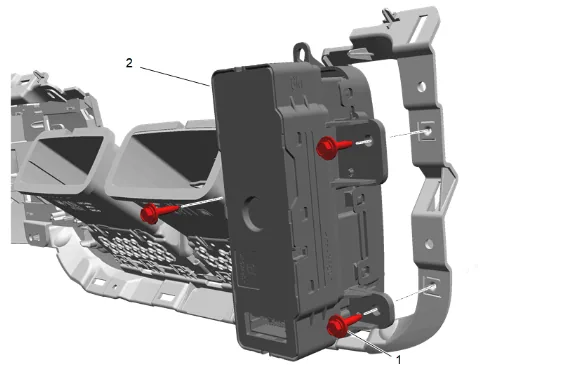
Electronic Transmission Shift Control Pushbutton Bolt (1) » Remove [3x]
-
Electronic Transmission Shift Control Pushbutton (2) » Remove Installation Procedure
-
Electronic Transmission Shift Control Pushbutton (2) » Install
-
Electronic Transmission Shift Control Pushbutton Bolt (1) » Install and tighten [3x] — Fastener Specifications
-
Connect the electrical connectors.
-
Instrument Panel Transmission Shift Opening Cover (2) » Install
-
Instrument Panel Center Trim Panel Bolt (1) » Install and tighten [6x] — Fastener Specifications
-
Connect the electrical connector.
-
Instrument Panel Trim Pad (2) » Install
-
Instrument Panel Upper Trim Panel Bolt (1) » Install and tighten [6x] — Fastener Specifications
-
Instrument Panel Center Trim Plate Applique (1) » Install
-
Instrument Panel Trim Plate Applique (1) » Install
-
Instrument Panel Fuse Block Access Hole Cover (1) » Install
-
Perform the shift control module programming and setup. K212 Gear Shift Control Module: Programming and Setup