Steering Wheel Airbag Coil Replacement
- Disable the SIR system. SIR Disabling and Enabling
- Extend the steering column to its furthest point to allow the instrument panel steering column upper trim cover to clear the instrument panel.
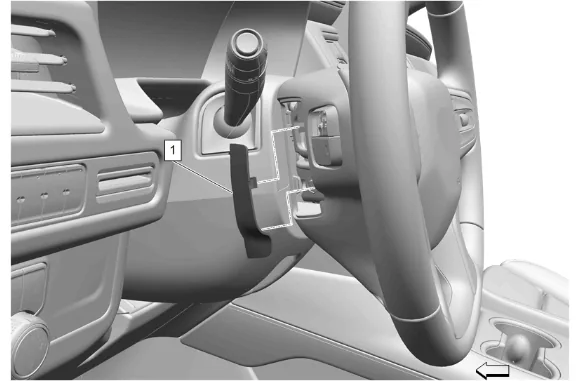
- Use a flat bladed trim tool to depress the steering wheel airbag access hole cover detents to remove the 2 steering wheel airbag access hole covers (1).
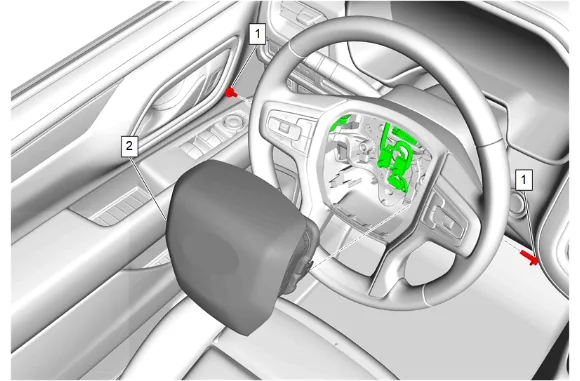
- Steering Wheel Airbag Bolt (1) » Remove [2x]
- Release the connector position assurance (CPA) retainer.
- Disconnect the electrical connectors.
- Steering Wheel Airbag (2) » Remove
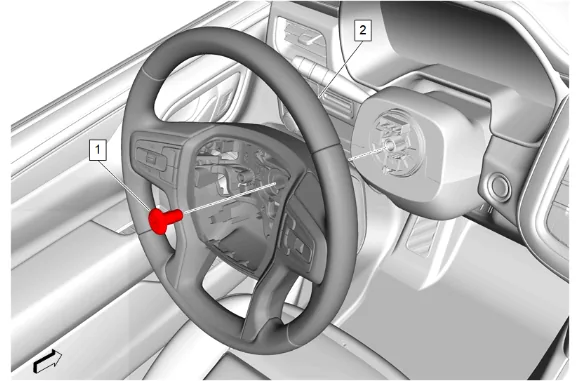
- Loosen the steering wheel bolt (1) so that 2 - 3 threads are engaged.
- Wiggle the steering wheel until the wheel disengages completely.
- Steering Wheel Bolt (1) » Remove
- Steering Wheel (2) » Remove
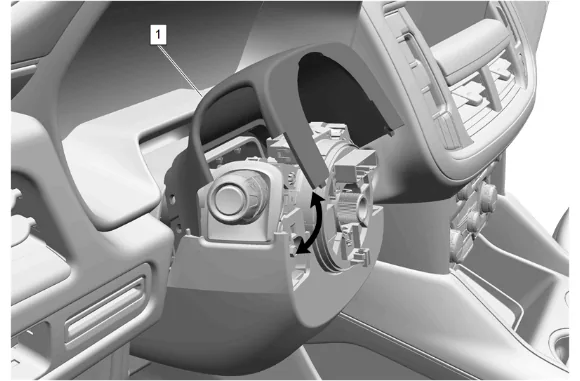
- Using a small plastic trim tool, separate the instrument panel steering column upper trim cover (1) from the instrument panel steering column lower trim cover.
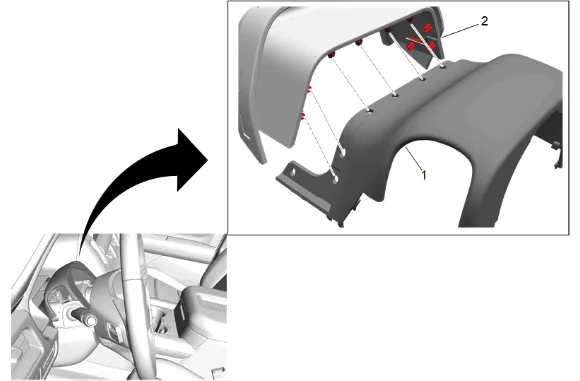
- Using a small plastic trim tool, separate the instrument panel steering column upper trim cover (1) from the instrument panel steering column opening closeout (2).
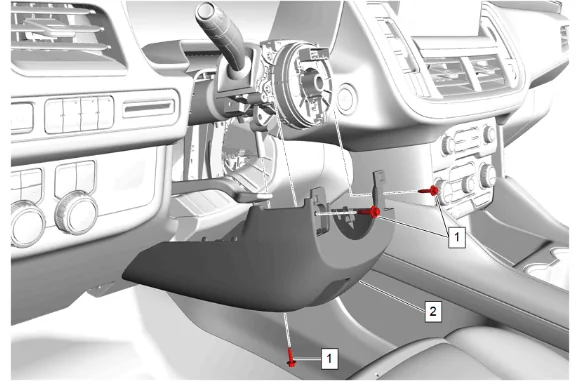
- Instrument Panel Steering Column Lower Trim Cover Bolt (1) » Remove [3x]
- Disconnect the electrical connector.
- Instrument Panel Steering Column Lower Trim Cover (2) » Remove
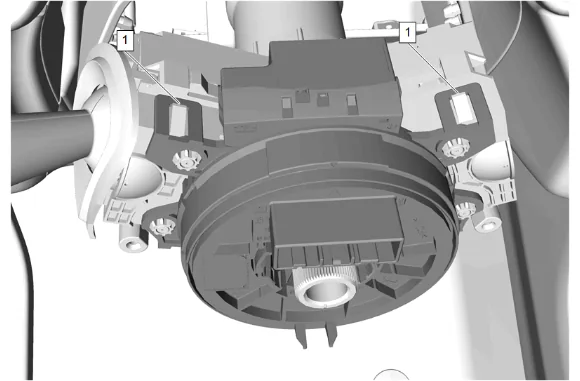
- Disengage the steering wheel airbag coil upper retaining tabs (1).
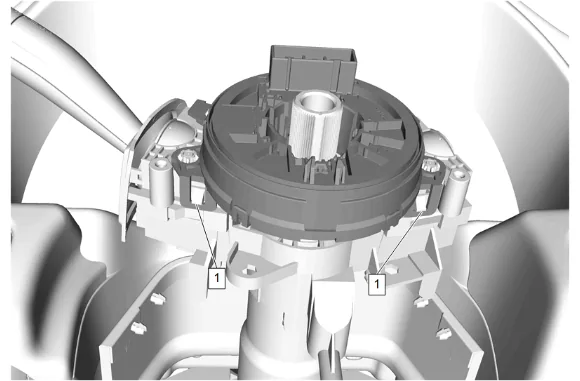
- Disengage the steering wheel airbag coil lower retaining tabs (1).
- Disconnect the electrical connector.
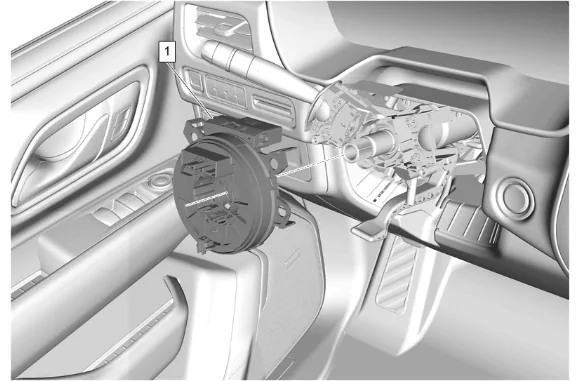
- Steering Wheel Airbag Coil (1) » Remove Installation Procedure
- Ensure the steering wheel airbag coil is CENTERED during installation. Steering Wheel Airbag Coil Centering
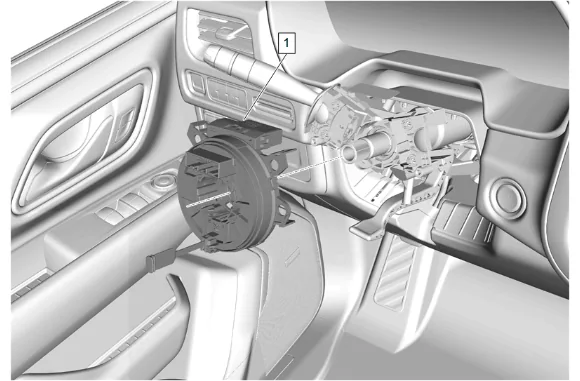
- Steering Wheel Airbag Coil (1) » Install
- Connect the electrical connector.
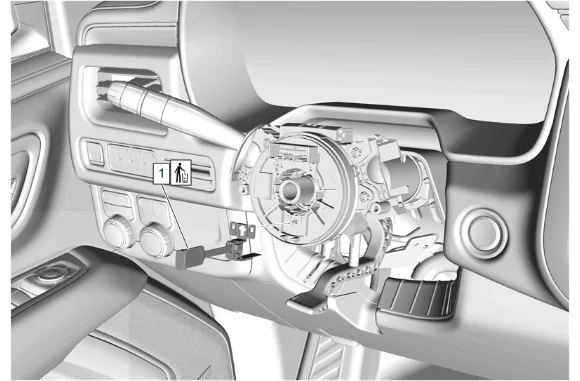
-
Remove the steering wheel airbag coil centering tab (1) and DISCARD.
-
Instrument Panel Steering Column Lower Trim Cover (2) » Install
-
Connect the electrical connector.
-
Instrument Panel Steering Column Lower Trim Cover Bolt (1) » Install and tighten [3x] — Fastener Specifications
-
Clip the instrument panel steering column opening closeout (2) to the instrument panel steering column upper trim cover (1).
-
Secure the instrument panel steering column upper trim cover (1) to the instrument panel steering column lower trim cover.
-
Steering Wheel (2) » Install
-
If a NEW threaded component is being installed, loosen the adhesive using a metal pick or similar tool before proceeding. If threaded component is reused, prepare the threaded component using the following steps: 11.1. Remove any loose cured adhesive from the external threads of the component using a lint free cloth. 11.2. Thread the cleaned component into the internal mating threads and remove to loosen trapped cured adhesive. 11.3. Remove loose debris from internal and external threads using compressed air. 11.4. Apply liquid thread locking adhesive in a strip along half of the length of the external threads, starting at the tip, just prior to installation. Adhesives, Fluids, Lubricants, and Sealers
-
Steering Wheel Bolt (1) » Install and tighten — Fastener Specifications
-
Connect the electrical connectors.
-
Install any connector position assurance (CPA) devices or secondary locks.
-
Steering Wheel Airbag (2) » Install
-
Steering Wheel Airbag Bolt (1) » Install and tighten [2x] — Fastener Specifications
-
Install the 2 steering wheel airbag access hole covers (1).
-
Enable the SIR System. SIR Disabling and Enabling